Syncing Chats Across Devices
Chat continuity across devices is really a question about which layer of the experience travels with your account and which one stays where it was created. Crushon runs on the web and on phones — an iOS app and an Android build — and the part that follows you between them is the account record: your character list and the memory details a character has built up. Expect 28 cumulative sessions over six weeks to appear as a single continuous history, and expect anything held only in a local browser session to stay local.

Key takeaways
- Three layers exist: the account record, the memory layer, and the raw local session. Only the first two are expected to travel.
- After a second install, check the character list first and the memory layer second; those two checks catch most surprises.
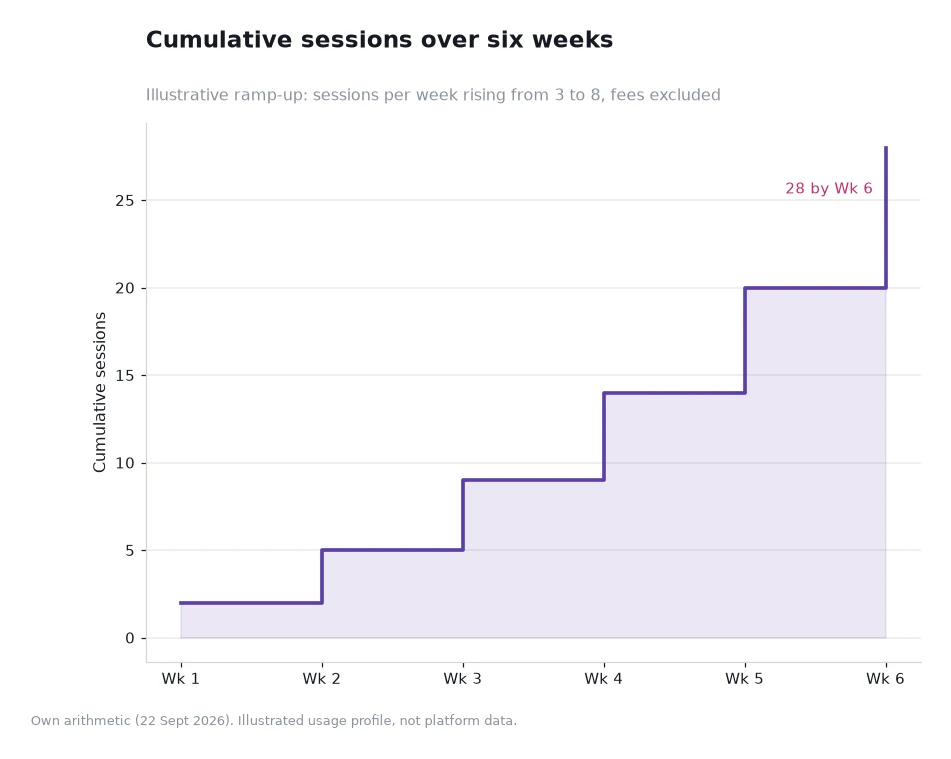
- Plan the session split rather than assuming it: a ramp of 2, 5, 9, 14, 20 and 28 cumulative sessions leaves room for phone-only weeks.
- A device that looks out of step is usually reading a different layer, not a broken one.
The three layers and what each one does
The first layer is the account record: the characters you have opened, the ones you saved, and the settings attached to the account. This is the layer designed to travel, and it is the reason a second device does not feel like starting over. If you log in on a new phone and your shortlist is there, synchronisation is working as intended.
The second layer is memory. Characters remember preferences and recall previous interactions, which means the continuity you notice most is not the transcript but the accumulated context: the details a character already knows about how you like a conversation to run. That layer travels with the account, and it is the one to verify when a chat on a new device feels slightly thicker or thinner than you remember.
The third layer is local. Browser history, autocomplete, an open tab, a cached page — these belong to the device they were created on, and no account system is expected to reproduce them elsewhere. Most complaints about "lost" chats trace back to this layer rather than to any failure: the conversation was continued in a tab that never travelled, while the account record and memory were never in doubt.
A four-step check after installing on a second device
Run the checks in order, because each one narrows the problem space. First sign in and confirm the character list matches what you expect. Second, open one character you have used for a while and see whether the memory layer is present. Third, start a short session to confirm replies are being generated normally. Fourth, close and reopen the app to confirm the state persists.
| Layer | Expected behaviour | Quick check |
|---|---|---|
| Account record | Characters, saved items and account-level settings follow the account | Sign in and compare the character list with the first device |
| Memory layer | Details a character has learned about your preferences carry across | Open a familiar character and continue an established thread |
| Recent conversation position | Usually resumes from the stored state rather than mid-word | Reopen a session and check where the thread restarts |
| Browser history | Stays with the browser it was created in | Check whether you were relying on the recents list rather than the account |
| Open unsaved tab | Stays with the device and the tab | If a thread looks missing, retrace it through the character, not the tab |
| Signed-in sessions | Each device holds its own session until you sign out | Review and sign out devices you no longer use |
The last two rows explain almost every "my chat vanished" report. Sorting the six rows into travel and local is the whole mental model, and it takes about five minutes of testing to confirm on your own setup.
Worked example: splitting 28 sessions across two devices
Assume a six-week ramp with two devices in play, one phone and one laptop, and a profile that starts small. Week one holds two sessions in total, both on the phone while you get used to the catalogue. Week two adds three sessions, one of them on the laptop during a lunch break. Week three adds four, week four adds five, week five adds six, and week six adds eight, which brings the cumulative line to 2, 5, 9, 14, 20 and 28.
Now look at where the incremental session lives. The single laptop session in week two is the interesting one, because it is the first session created on a device that is not the primary one. Everything the account is supposed to carry — character list, saved items, memory — has to be present for that session to feel like a continuation rather than a cold start.
If it does not, the diagnostic is trivial: the account layer is missing, or the session was created outside the signed-in account. The arithmetic here is the author's illustrative profile rather than platform data, and it excludes fees; its purpose is to show how early the cross-device question arrives, usually in the second week rather than the second month.
When a device looks out of step
Three explanations cover most cases. The most common is that the session was never attached to the account: it happened in a browser tab that was not signed in, so there was nothing to carry. The second is a lag between the action and the visible state, which resolves on a refresh or a reopen. The third is a genuine mismatch worth reporting, which is where the platform's own documentation becomes useful rather than the topic of a forum post.
The platform's reference page for this area is https://crushon.ai/ai-porn-chat, which sets out how characters recall previous interactions and adapt over time — the mechanism behind the memory layer described above. If you want the mechanics explained at more length, the AI chat blog publishes walkthroughs, and it is a better first stop than guessing at what a device did or did not store.
One expectation worth correcting before it causes annoyance: a second device will not reproduce the feel of a conversation you have built up over weeks in a single session. The memory layer carries the substance, and the first few messages on the new device are where that substance becomes visible again.
Frequently asked questions
Will my conversations appear on a new phone automatically?
The account record is the layer designed to travel, so sign in first and check the character list. From there, opening a familiar character is the quickest way to see whether the memory layer came with the account.
Why is my browser history different from my chat history?
They are separate records. Browser history belongs to the device and the browser profile, while chat state belongs to the account. Reading one as evidence about the other is the source of most confusion.
Should I sign out on a device I am about to sell?
Yes, and do it before the device leaves your hands. Each device holds its own session, so signing out is the step that removes the old access rather than merely stopping use.
Does using two devices change how characters behave?
Not in principle. The memory layer belongs to the account, so a character meets the same context regardless of which screen you are using, provided you are signed in on both.
Set it up once and stop thinking about it
Before your next session on a second device, do the four checks in order: character list, memory layer, a short exchange, and a reopen. Ten minutes confirms the whole arrangement.
Then keep one rule: if a conversation matters to you, make sure it happened under the signed-in account rather than in a tab. That single habit removes the only synchronisation problem most people ever hit.
Data and sources: platform pages describing Porn Chat AI, character memory behaviour and the availability of web, iOS and Android builds, read 22 Sept 2026[1]. Session figures are the author's illustrative arithmetic and exclude fees. Article written for adults who are 18 or older.